











A distinctive feature of shamans, thanks to which they are very popular in a group or raid, are totems, when installed, allies receive various kinds of bonuses, and opponents receive either negative effects or damage. There are totems for all occasions, there are quite a lot of them, and they are divided into 4 types - totems of air, earth, water and fire. You can install totems of all types at the same time, but you cannot install several totems of the same type - installing a subsequent totem replaces the previous one.
Restoration shamans are highly sought-after healers in WoW Classic due to their ability to both mass heal and single-target healing, and their ability to remove poisons and diseases from allies and buffs from enemies, combined with bonuses from totems, makes them almost irreplaceable .
Although the main resource of Restoration shamans is mana, spent on healing spells, they are entrusted with the function of Totem Twisting to help melee units. The main idea of Totem Twistinf is periodically summon Windfury Totem and another air totem. When summon Windfury Totem, a 10-second buff is placed on group members, which does not disappear even if the totem is destroyed or replaced with another. Thanks to this feature, the shaman can twisting Windfury Totem with another wind totem and receiving bonuses from both totems at once - after installing the Windfury Totem and receiving a buff, another totem is installed, when the buff from the Windfury Totem ends, the Windfury Totem totem is summons again, the buff is updated and another totem can be used again for the next 10 seconds. Usualy for Totem Twisting use Grace of Air Totem and Tranquil Air Totem. If you need Totem Twisting via program you should fill field under the Grace of Air Totem image in the program, otherwise leave this field empty.
Rotation (priority list) for Restoration Shaman:
1. Determining the group member (target) with the minimum Health percent. If the target has more than 25% of health, and the tank has less than 70%, then the target is a tank.
2. Summon totems if target has more than 70% / 50% (for tank / for non tank) Health.
3. Nature's Swiftness if target has less than 35% (for tank) / 25% (for non tank members) Health.
4. Healing Wave maximum rank if target has Nature's Swiftness buff.
5. Lesser Healing Wave if target has less than 50% Health.
6. Cure Poison if target has Poison debuff.
7. Cure Disease if target has Disease debuff.
8. Chain Heal to the tank if target is not tank and target has more than 60% Health, but tank is missing more Health than 80% of healing effect from Chain Heal.
9. Chain Heal to the target if it has less than 60% Health and count of members for healing is more than one.
10. Healing Wave maximum rank if target has less than 75% health.
11. Chain Heal to target ir count of members for healing is more than one.
12. Healing Wave rank 5 if target has less than 85% Health.
13. Healing Way rank1 if target is tank, it health persent less than 95% and Healing Wave taken.
If no one members are require to healing then program start attack target of previously choosen party member:
14. Purge if target has positive Magic effect.
15. Earth Shock for casting interrupt.
16. Flame Shock if target has more than 30% Health and you have more than 40% Mana.
17. Lightning Bolt if you have more than 40% Mana.
It should be noted what you can use any totem of the same school of magic that has no CD, and not exactly the one that is drawn in program, but if you need Totem Twisting then in the field for Windfury Totem must be filled exactly it.
Target selection mode
The program can work both in manual target selection mode, when you independently select a target for heal, and in automatic selection mode. To use the program in automatic selection mode you need to create a macro in the game:
/target partyNtarget
where N must be replaced with the number of the group member whose target must be attacked if there is no need for heal. For example, if you want to assist the 3rd member of the group, the macro will looks like /target party3target.
This macro must be placed on the action bar, and the button on which the macro was placed must be entered into the program in the PT field:

You should also set the binds for selecting group members to the default - pressing F1 should target your character, F2 - the first group member, F3 - the second, F4 - the third and F5 - the fourth:
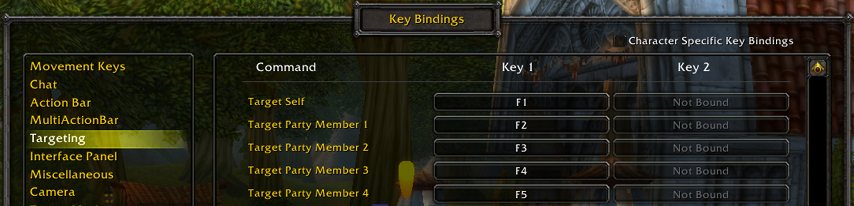
After clicking on Start and reloading the game, the program will display in the chat (the text is visible only to you) the message "Select tank" - you should target the group member who is assigned the role tank.
If you want select targets manually, you should leave field for PT empty.
Auto select members mode works only in 5-ppl party.
If you have any comments or suggestions for improving then you can express them on the forum - just make a topic with your proposal in the appropriate section.